AFEthernet PHY configuration and SSH access
Added by Anonymous fpga 10 months ago
Hello,
I am working with a MitySOM-5CSx module on my own custom carrier board and I am seeing different behavior depending on which SD card image I use. I would appreciate your help to understand the correct configuration.
Hardware setup:
SoM: MitySOM-5CSx
Critical Link development kit: MitySOM-5CSx Dev Kit (used as reference)
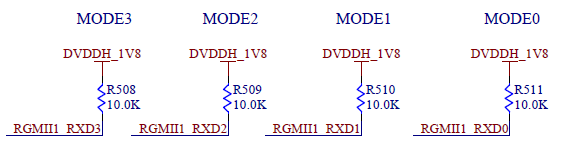
My custom carrier: same RGMII connections as the dev kit (clipboard-202512081603-uzgqp.png)
MODE0, MODE1 and MODE2 pins on the PHY are now strapped to match the dev kit schematic (same pull-up / pull-down configuration).
Behavior with the original dev-kit SD card
When I use the original SD card that shipped with the dev kit:
Linux boots correctly on my custom carrier.
eth0 comes up and receives an IP address from DHCP.
I can reliably ping the board and I can open an SSH session (e.g. ssh root@<board_ip>).
Network traffic appears stable.
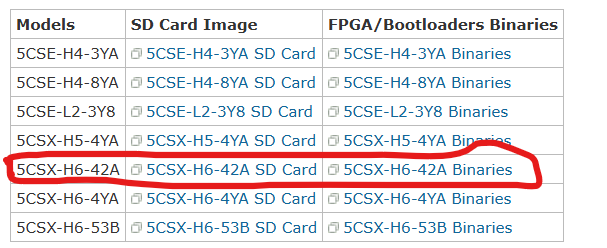
Behavior with a new SD card programmed from your website image
I downloaded an SD card image from your website/wiki (clipboard-202512081607-5qri5.png) and wrote it to a new SD card.
With this image:
Linux also boots correctly.
eth0 comes up and receives an IP address from DHCP (for example 10.10.121.3, gateway 10.10.121.254).
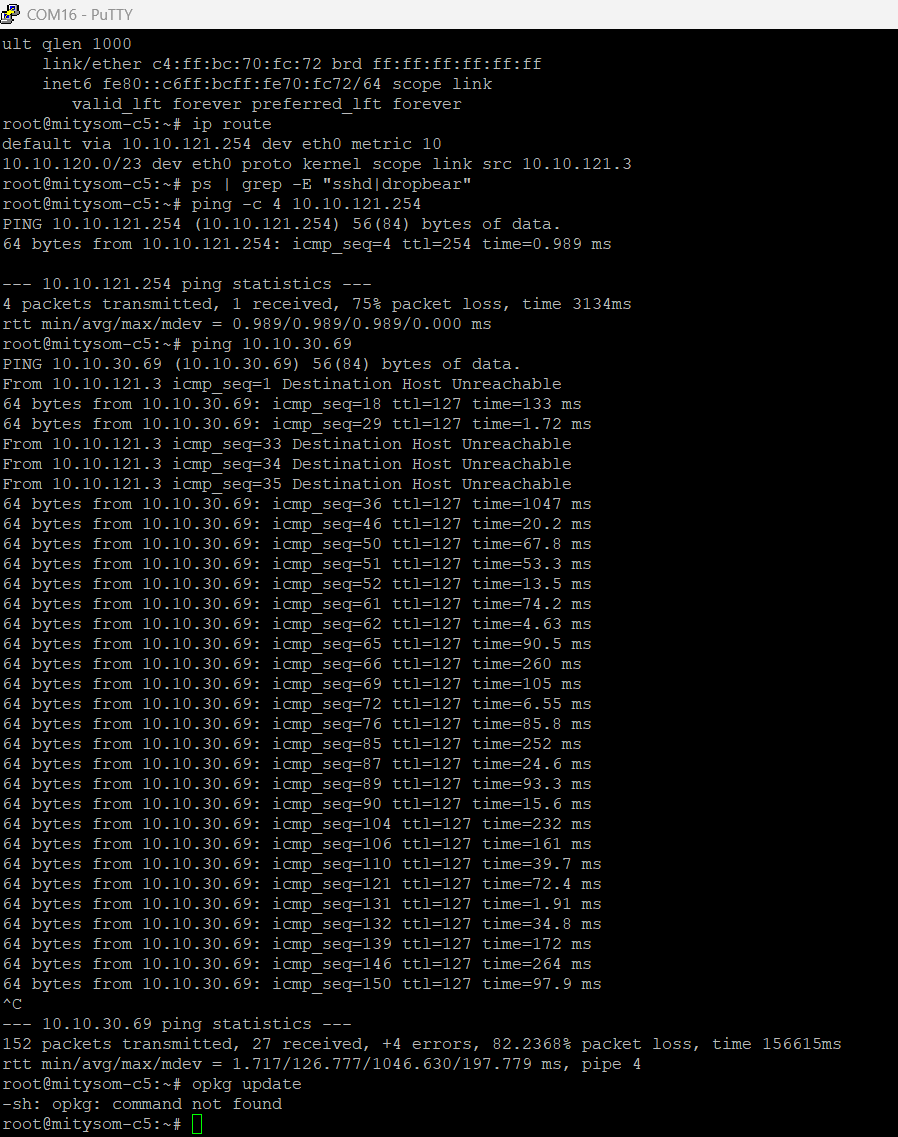
However, there is a lot of packet loss when I ping the board from my PC, and
I cannot connect via SSH: ssh root@10.10.121.3 always ends with “Connection timed out”. (
clipboard-202512081627-wp3pk.png)
On the console, there is no sshd or dropbear process running, and there is no opkg binary, so I cannot simply install a SSH server from packages (clipboard-202512081609-iswi2.png).
So, with the original dev-kit SD card SSH works fine on my custom carrier, but with the new SD image from the website SSH is not available and the network connection is unstable.
Questions
Is the SD card image I downloaded intended to include a running SSH server by default (either OpenSSH or dropbear)?
If yes, do you have any recommendations or known issues regarding SSH on this image?
Could the SD card image assume a different MODE0/MODE1/MODE2 configuration or a specific PHY MDIO address than what I have on my carrier?
Thank you in advance for your support.
Best regards,

Replies (7)
ZM RE: Ethernet PHY configuration and SSH access - Added by Zachary Miller 10 months ago
Hi Atef,
The image you downloaded should have an SSH server (OpenSSH) running by default, yes. ps by default doesn't show all processes, which is why the grep in your screenshot didn't find it. Running ps -A or ps aux should confirm that sshd is running.
We don't have any known issues with SSH on this image, but since you're having trouble pinging as well, I suspect this is a more general Ethernet issue. One change that our more recent kernels (including the image you downloaded but probably not the one that came preinstalled on the original dev kit) have is that the default PHY skew adjustments in our device tree require the PHY to be detected at address 3. If it's not, the skews will most likely be missing, which can cause quite bad packet loss depending on the carrier.
You can confirm what PHY address was detected by running ethtool eth0 | grep PHYAD. Note that previous versions of our dev kit used address 2 and also had missing level translation that could cause unreliable address latching; if you referenced revision 10 or earlier, there's a good chance this is the issue.
If the PHY is reliably being detected at an address other than 3, you can try changing the reg value in the phy0 device tree node to match; or, if you let us know the detected address, we can provide an updated device tree with the change. Long term, if you're planning to use a custom device tree anyway, there's not really any reason to match the dev kit's PHY address if you used 2 or another value in your design (although we still recommend the level translation discussed in the link above, if possible). If you do want your carrier to work better with our stock device tree though you'd need to change the PHYAD strapping resistors to select address 3.
As an aside, in case you have a local Yocto build you'd like to install packages from, our MitySOM-5CSx images are configured with rpm as the package manager rather than opkg. We don't host a package server though, so you'd need to build any desired packages yourself.
Zach
AF RE: Ethernet PHY configuration and SSH access - Added by Anonymous fpga 10 months ago
Hi Zach,
Thank you for your reply.
I ran ethtool eth0 | grep PHYAD on my system, and it confirms that the PHY is detected at address 3, as shown in the attached screenshot.
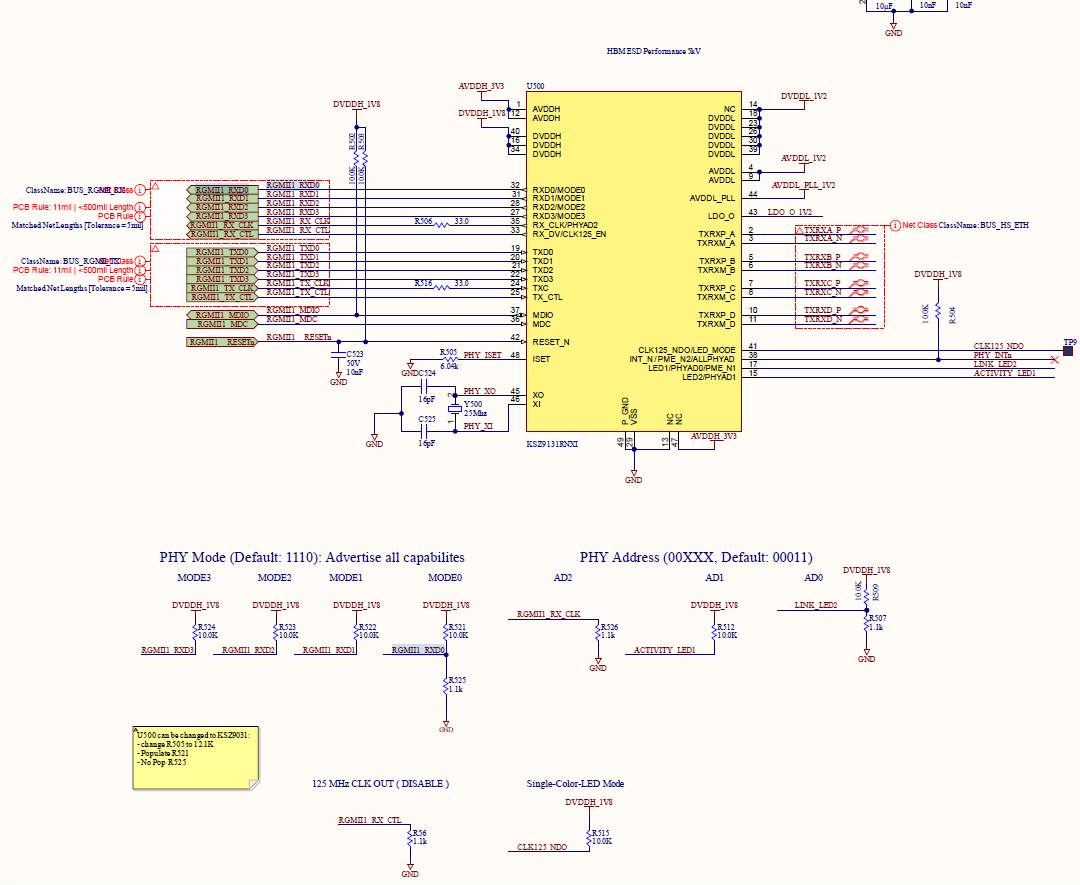
Could you please let me know if the Ethernet hardware section of my carrier board (PHY and RGMII connections) looks correct (R525 is not connected) ?
clipboard-202512090911-npx5h.png
Also, how can I verify that there are no RGMII skew/timing issues in my hardware design? Do you have any specific checks or measurement methods you recommend for this?
clipboard-202512090915-aewdr.png
Thanks

AF RE: Ethernet PHY configuration and SSH access - Added by Anonymous fpga 10 months ago
Hi Zach,
Just a quick update on my side.
I am now able to communicate over Ethernet with our custom carrier board. However, in some cases I still observe data loss that results in dropped connections. My current suspicion is that this may be related to the RGMII traces on our Ethernet interface at 1 Gb/s (signal integrity / skew issues).
If you have additional recommendations for checking RGMII layout or timing on the MitySOM-5CSx, I would be very interested.
Thanks,
MW RE: Ethernet PHY configuration and SSH access - Added by Michael Williamson 10 months ago
Hello,
For layout, the two groups you have outlined in your schematic snippet should be matched in length and ideally be on the same layer. The clocks should be separated from the data lanes by at least 5x trace width. We usually use a 5mil matching rule for RGMII trace groups, with 50 Ohm impedance.
The PHY datasheet also has some routing rules regarding the ground plane between the PHY and the magnetics and Jack.
With regards,
Mike
AF RE: Ethernet PHY configuration and SSH access - Added by Anonymous fpga 10 months ago
Hi Zach,
Could you please generate a Linux image for the 5CSX-H6-4YA based on the Linux image available at the following link (https://support.criticallink.com/redmine/projects/mityarm-5cs/wiki), but configured so that the Ethernet link is limited to 100 Mbps instead of 1 Gbps?
Regards
DV RE: Ethernet PHY configuration and SSH access - Added by Daniel Vincelette 10 months ago
Hi Atef,
You should be able to do this via ethtool:
ethtool -s eth0 speed 100 duplex full
My appologizes if you already tried this but thought I'd give a quicker approach if you're trying to test out different speeds.
Regards,
Dan
AF RE: Ethernet PHY configuration and SSH access - Added by Anonymous fpga 10 months ago
Hello,
I am using a MitySOM-5CSX SOM on the standard Critical Link carrier (development kit) with Yocto (Poky 2.4.4, kernel 5.4.23-yocto-standard). I am trying to validate the USB OTG port J401 in host mode with a USB flash drive.
At boot, the DWC2 controller is correctly initialized:
dwc2 ffb40000.usb: DWC OTG Controller
USB bus 1 is registered, and usb-storage / usbhid drivers are loaded.
/sys/class/udc contains ffb40000.usb.
The serial gadget module (g_serial) is not present in this image, so I focused on host-mode testing.
Host test procedure:
Board powered on, nothing connected to J401.
Run dmesg -w on the serial console.
Plug a mini-B OTG to USB-A female adapter into J401.
Plug a known-good USB flash drive into the adapter.
Result:
No new USB messages appear in dmesg -w, and no device is listed by lsusb or lsblk, regardless of the flash drive used. The behaviour is repeatable.
Could you please confirm whether there are additional steps required to use J401 in host mode, or if this behaviour suggests a possible hardware issue on the J401 USB OTG port or its power circuitry?
Thank you in advance for your assistance.
Regards