Display Options
The MitySOM-QC6490 Devkit has multiple options for display output including DisplayPort, DSI, and DisplayPort over USB-C.
Development Board Configuration
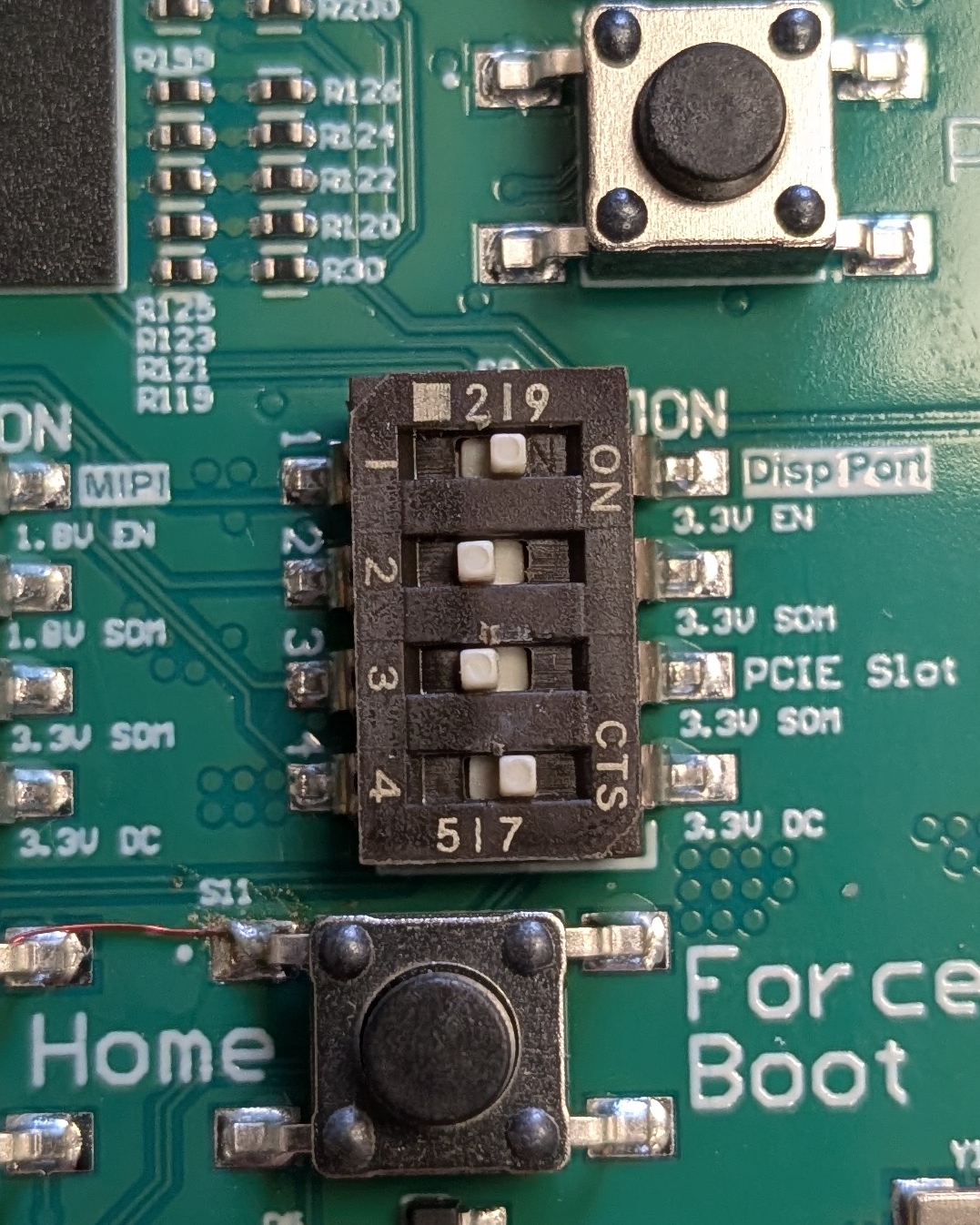
Ensure that Switch S9 is set properly.- Switch 1 should be set to enable the 3V3 DP from the DC supply
- Switch 2 should NOT be set for Rev 1 or 2 of the Development Board as 3.3V from the SOM may actually be a higher volage. See MitySOM-QC6490 Development Kit Datasheet.
- For Rev 3 onward, Switch 2 can be either set or not set.
- If Switch 2 is not set the 3.3V comes from the DC supply on the Development Kit
- If Switch 2 is set the 3.3V comes from the SOM
- For Rev 3 onward, Switch 2 can be either set or not set.
- Note: Switch 3 PCIe "3.3V SOM" must be OFF for DisplayPort to work properly on Rev 1, Rev 2, Rev 3 and Rev 4 versions of the Development Board.
- Note: Switch 4 PCIe "3.3V DC" must be ON for DisplayPort to work properly on Rev 1, Rev 2, Rev 3 and Rev 4 versions of the Development Board.
DisplayPort
The DisplayPort interface is compatible with the VESA DP 1.4 standard.
This interface was verified using a DisplayPort to DisplayPort cable to connect to a ASUS VA24DQSB monitor using a 1920x1080 resolution @ 75 Hz framerate, as well as a ViewSonic VA2715-2K-MHD monitor using a 2560x1080 resolution @ 50Hz framerate.
Note: DisplayPort and DSI cannot be used concurrently, they are mutually exclusive.
MIPI DSI
The DSI interface is pinned out to connector J15 on the bottom side of the devkit PCB. It can be used in conjunction with an adapter board to connect a compatible display.
The CriticalLink QC6490/5430 Display Expansion Board is available as a reference, or as an off the shelf solution.
- Following the set up steps in Building and Customizing qcom-multimedia-image with Yocto and stopping before
bitbake qcom-multimedia-image - Editing
build-qcom-wayland/conf/local.confand addingDTS_DEFINES:append = " ENABLE_RPI_PANEL"
- Continuing on to build
qcom-multimedia-imagewith commandbitbake qcom-multimedia-image
Note: DisplayPort and DSI cannot be used concurrently, they are mutually exclusive.
DisplayPort over USB-C
Support for DipslayPort over USB-C will work out of the box with BSP Release 1.2 and a rev4 MitySOM-QC Development Board.
The MitySOM-QC6490 Devkit supports DisplayPort over USB-C (4K60 display support with USB3 + DisplayPort concurrency). It can be configured for 2-lane or 4-lane DisplayPort (DP) Alt Mode.
Display Verification Options
Display an Image
export XDG_RUNTIME_DIR=/dev/socket/weston
export WAYLAND_DISPLAY=wayland-1
weston-image image.jpg
Running the glmark2 benchmark
glmark2 is available for bench marking or demonstrating the graphics output. It can be run with the following series of commands:
export XDG_RUNTIME_DIR=/dev/socket/weston
export WAYLAND_DISPLAY=wayland-1
glmark2-es2-wayland --fullscreen --annotate --run-forever